


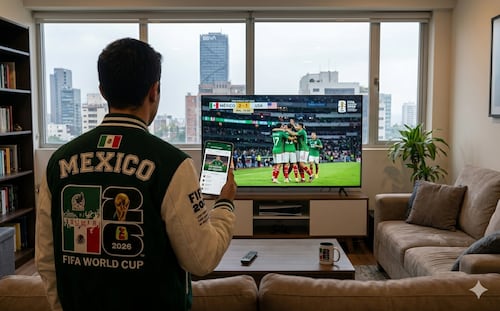
Add the 2026 World Cup Schedule to Your Google or Apple Calendar: Here's How
Translated from Spanish, summarized and contextualized by DistantNews.
At a glance
News
Sources not specified
Context piece
- The 2026 World Cup calendar can be added to Google Calendar and Apple Calendar via calendariomundial2026.com.
- The tool allows users to sync all 104 matches or follow specific teams and knockout rounds.
- Schedules automatically adjust to the user's time zone and location, with updates for advancing teams.
Fans eager to follow every match of the 2026 World Cup, the largest tournament in history with 48 teams and 104 games across three countries, can now easily integrate the entire schedule into their digital calendars. A dedicated website, calendariomundial2026.com, offers a smart, automatically updating calendar that can be synced with popular services like Google Calendar, Apple Calendar, Outlook, and other digital platforms.
This tool provides a streamlined way to receive reminders before each game, eliminating the need to constantly check schedules. Users can customize their experience by choosing to follow all 104 matches, select specific national teams, or combine favorite teams with knockout stage games. After selecting their preferred option and setting their time zone, the system generates a compatible file for quick integration into personal calendars.
For users with Apple devices, the process is particularly seamless due to iOS's native calendar integration. Upon visiting the website and selecting the iPhone or iPad option, a prompt will appear to subscribe to the calendar. Once authorized, all World Cup matches will be automatically added to the device's Calendar app.
A key advantage of this feature is its automatic adjustment to the user's local time zone and location. As teams advance through the tournament, new matchups will be incorporated into the calendar without requiring any manual updates from the user, ensuring a consistently up-to-date schedule throughout the event.
DistantNews Editorial
Originally published by El Universal in Spanish. Translated, summarized, and contextualized by our editorial team with added local perspective. Read our editorial standards.
More Stories


From Our Blog

What Press Freedom Means for the News You Read

What Gets Lost (and Found) When News Is Translated

The Critical Role of Diaspora Media in Global News

What Travellers Should Know About Countries with Restricted Press

A Digital Nomad's Guide to Following Local News
